
◎
Fast built-in views
Move among All Open Reqs, Work Orders, Scheduled Tasks, My work, On Hold items, and Reqs closed within the last 24 hours.
Work Order Management
REQQER gives facility teams one central Requests Console for managing one-time Work Orders alongside recurring Scheduled Tasks—without losing the distinction between them.
Prioritize the work, assign responsibility, document progress, keep On Hold items visible, and get back to recently completed work quickly.
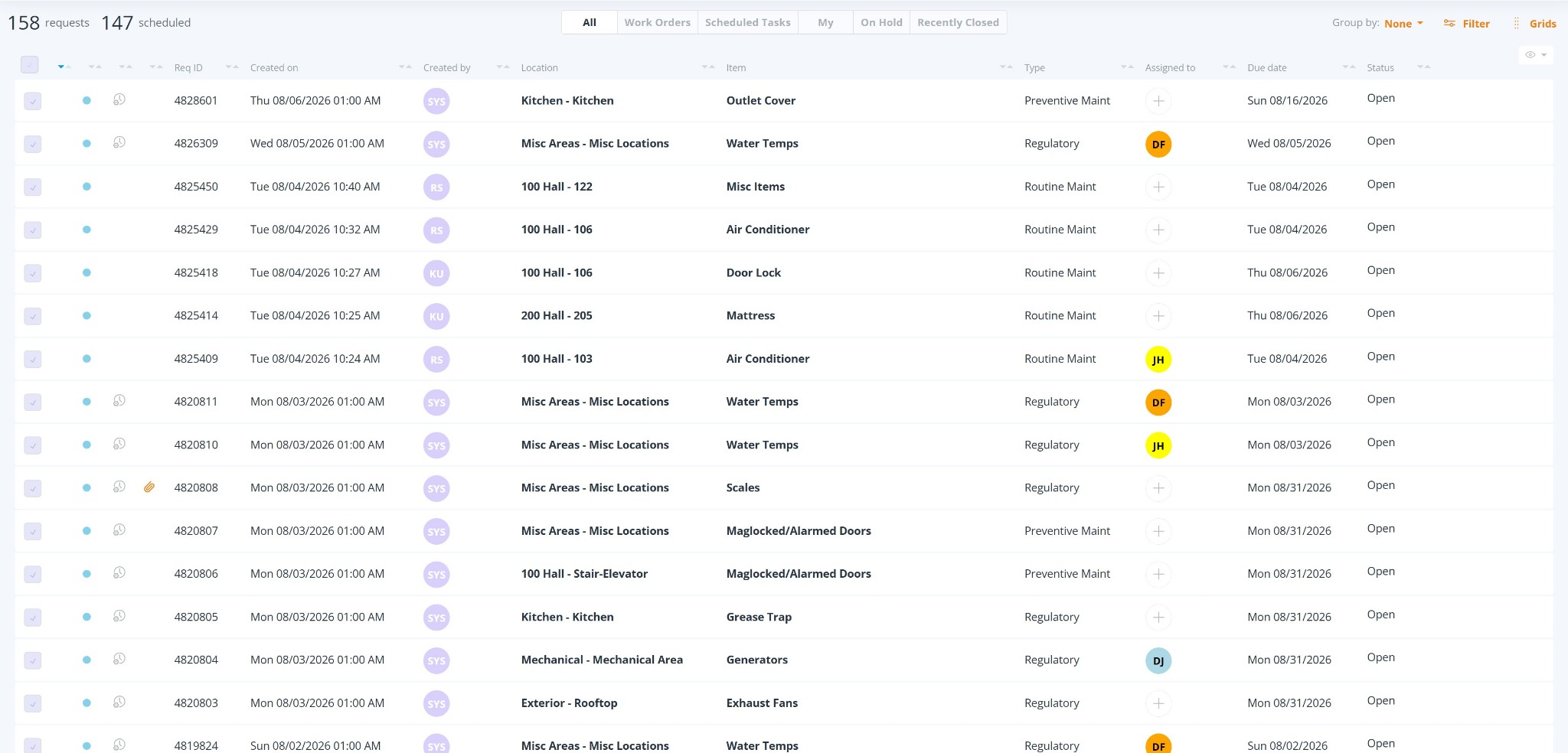
One working list
The Requests Console is the working center for Desktop REQQER. Built-in views handle common questions immediately; detailed filtering and interactive summaries are available when you need to narrow the list further.
Move among All Open Reqs, Work Orders, Scheduled Tasks, My work, On Hold items, and Reqs closed within the last 24 hours.
Use detailed filters for dates, status, Type, Work Order versus Scheduled Task, frequency, Item, Location, assignment, vendor, Department, priority, and more.
See assignment, Due Date, status, Scheduled Task and attachment indicators—and assign available staff directly from the Console when permitted.
Explore the Requests Console
The deeper controls are there when you need them without forcing every user through a complicated workflow for ordinary work.
Working view
The default Console presents Open work while keeping one-time Work Orders and recurring Scheduled Tasks distinguishable and immediately accessible through built-in views.
Work Orders and Scheduled Tasks
A Work Order is one-time work. A Scheduled Task is an individual occurrence generated from a recurring Scheduler definition. Both are Reqs and both can appear in the Requests Console, but REQQER preserves the difference because recurring obligations need their own history and future schedule.
Created for a specific issue, service need, walkthrough finding, or other non-recurring request.
Generated from the Scheduler as one separately trackable occurrence of recurring work.
Keep work accountable
Record work performed, progress, communications, next steps, and the actual time spent. Prior Activity remains part of the Req history.
When work cannot proceed, permitted Desktop users can place the Req On Hold so it remains visible and trackable rather than being mistaken for completed work.
Users with appropriate permission can reopen a completed Req from the Requests Console when additional work is required.
The Internal Assignee identifies the in-house person responsible for managing and ensuring completion of the Req.
An outside specialist can be assigned while the Internal Assignee remains responsible for follow-up, documentation, and proper completion.
Photographs, reports, proposals, certifications, and other supporting files remain associated with the work instead of being separated into unrelated folders and inboxes.
Req lifecycle
The individual Req becomes the shared operational record rather than a disposable ticket number.
Multiple ways in, one managed process
One-time Work Orders can be captured through the interface appropriate to the person reporting the issue, while the resulting work enters the same management process.
Related capabilities
See Work Order Management in context
We can focus a demonstration on request intake, assignment, daily work management, Mobile workflows, documentation, or the relationship between Work Orders and recurring Scheduled Tasks.